- On the Manage Grades page, click the action menu for the grade item and click on Enter Grades
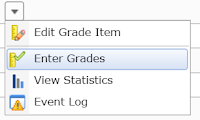
- On the Grade Item page, click the action menu for the item name and then click Event Log - this opens in a new window and shows the original score for each student for that grade item

04 December 2015
Use the event log to recover old grades
Let's say you change the points possible for a grade item from a higher value to a lower value. If the grade item is set so scores cannot exceed the points possible, the scores for students will be lowered to that new value. To see the original scores, view the Event Log for that grade item:


09 November 2015
Options for group discussion instructions

This becomes a challenge for forums that have multiple topics with the same description. For example, a class might be divided into dyads or triads and each group needs its own discussion topic. To make that description easily visible to each topic can be done by copying and pasting into the topic description for each of the fifteen to twenty (or more) topics for that group. (The main blog entry on groups has more information on group options.)
Another option is to add the discussion instructions as a thread and simultaneously post that thread to all of the discussion topics within the group forum. This is only an option when creating a new thread as part of the Posting Options at the bottom of the Compose window. The demo video shows how to do this.
20 October 2015
Excusing a Student's Grade
The option to drop ungraded items can be used to excuse a particular assignment from a student's grade in a class. The assignment still appears on the Grades page, but without a score it will be excluded from the final grade calculation.
25 August 2015
One-on-one Groups for Private Conversations inside D2L
Groups and discussions tools can be used to set up private conversations between instructors and students inside a D2L course offering.
24 August 2015
The Pearson Widget and D2L
It is now possible to add a widget to connect your course offering in D2L with the MyLab product from Pearson.
Subscribe to:
Posts (Atom)