Anonymous messages cannot be assessed.
30 March 2011
Instructors know anonymous discussion authors
A discussion forum or topic can be set up to allow authors to post messages anonymously. Other students cannot see the author of anonymous messages but instructors can. Next to the date and time of the post is a blue info icon. Click on that to see the author's name. The first and last name appear but not the username.

Anonymous messages cannot be assessed.
Anonymous messages cannot be assessed.


21 March 2011
Local storage for purged course offerings
After three calendar years, official course offerings are purged (permanently deleted) from the Los Rios Desire2Learn server. Official course offerings connected to the summer 2008 term will be purged prior to the beginning of the summer 2011 term, official course offerings from fall 2008 will be purged prior to fall 2011, and so on. While a single-file snapshot of a course offering that includes student data cannot be created, there are ways to store data locally. Local storage includes course components, discussion entries, discussion statistics, grades, quiz attempts, dropbox submissions, and content access statistics. [VIDEO DEMO]
Note that this policy does not affect development course offerings or course offerings used for clubs and organizations.
Note that this policy does not affect development course offerings or course offerings used for clubs and organizations.
11 March 2011
Manage Dates
Adjusting the availability dates for items in a course offering after copying its material over into a different course offering for a new term is easy with the Manage Dates tool. This tool is available on the Edit Course page. [VIDEO DEMO]
Note that this tool does not change the dates for Submission Views for quizzes; those must still be adjusted manually.
Note that this tool does not change the dates for Submission Views for quizzes; those must still be adjusted manually.
22 February 2011
Student access to classlist
On the classlist students are only able to see people enrolled in the same section, which is why a student taking a lab / lecture class cannot see classmates enrolled in other labs. There are a couple of workarounds for instructors who want students to be able to contact each other online:
- Create a separate document (content topic – new file is the best way) that has all students and their email addresses listed. It will not have the automatic connection to D2L’s send email tool but it will facilitate communication.
- Another option is to create a discussion topic for students to introduce themselves. All students enrolled in a course offering can see all messages on a topic, and from there they can email each other using D2L’s send email tool.
Parallel Organization in Manage Files and Manage Content
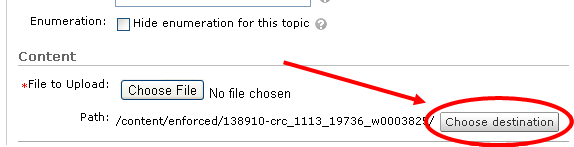
A good reason to give the files in the Manage Files area an organization parallel to what you have in the Manage Content area, where folders in Manage Files match the modules in Manage Content, is it makes selective copying of content and course files much easier. I found it effective to create the folders before creating any content topics. That way when I click the Choose Destination button on the New Topic page I will have a place to stick the new or uploaded file that matches the module structure already in place.

Subscribe to:
Posts (Atom)