- Create a separate document (content topic – new file is the best way) that has all students and their email addresses listed. It will not have the automatic connection to D2L’s send email tool but it will facilitate communication.
- Another option is to create a discussion topic for students to introduce themselves. All students enrolled in a course offering can see all messages on a topic, and from there they can email each other using D2L’s send email tool.
22 February 2011
Student access to classlist
On the classlist students are only able to see people enrolled in the same section, which is why a student taking a lab / lecture class cannot see classmates enrolled in other labs. There are a couple of workarounds for instructors who want students to be able to contact each other online:


Parallel Organization in Manage Files and Manage Content
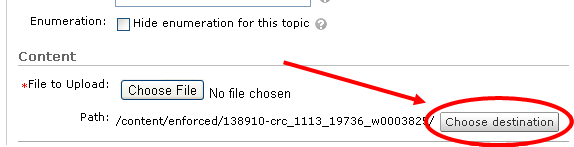
A good reason to give the files in the Manage Files area an organization parallel to what you have in the Manage Content area, where folders in Manage Files match the modules in Manage Content, is it makes selective copying of content and course files much easier. I found it effective to create the folders before creating any content topics. That way when I click the Choose Destination button on the New Topic page I will have a place to stick the new or uploaded file that matches the module structure already in place.

25 January 2011
Question Metadata and Efficient Quiz Creation
For the most efficient use of quiz questions if you want to make sure that students are asked certain types of questions (those that measure the achievement of a particular learning outcome, those that are classified by level of difficulty, etc.), group them into separate sections in the Question Library that have the appropriate metadata as part of the name. For example, instead of one section for all 160 multiple choice questions for chapter 1, create a section containing the 20 multiple choice questions associated with outcome 1.1, another 20 for those associated with outcome 1.2, etc. Doing so will make it easy to create random sections in a quiz where there are three questions that focus on outcome 1.1, four on outcome 1.2, etc.
22 January 2011
Names for Content Topics
For the content in my online class, I typically have a module per week or lecture subject. The first content topic within that module is an overview of the subject, with a list of associated assignments and other resources I have available within that module. I like to give that topic the title "Overview," but this can cause a problem when I want to link to that topic from some other place or use it as part of a release condition. In a full-term class I might have a dozen or more topics named "Overview" and therefore might pick the wrong one. To help me with this I include the name of the module in the name of the overview content topic (e.g., "Reconstruction Overview"), but still call it "Overview" in the Short Title field.
21 January 2011
Simultaneously edit content items
On the Manage Content page, the multi-edit icon can be used to make changes to several topics and/or modules simultaneously. [VIDEO DEMO]
Subscribe to:
Posts (Atom)